What is gigstr?
The short answer, then every question we get asked
gigstr is a free gig diary for iPhone. Add every gig you've been to, rate the night out of 10, keep the setlist and your photos with it, and get your year back as a report. There's no limit on gigs, and no ads.
At a glance
- Price
- Freeno limit on gigs, no ads
- Works on
- iPhoneAndroid is on its way to Google Play
- Adding a gig
- Scan the ticket or the poster, or search the artist; bring your past gigs in from a spreadsheet, setlist.fm or your iPhone's calendar
- Ratings
- /10overall, then the sound, the performance, the venue and more
- Setlists
- From setlist.fm, with gigstr's prediction before the night
- Your data
- Download a copy any time, or delete the lot from the app
- Made by
- One gig-goer in the UK
What it does
A gig's whole life, in one app
01
Before the night
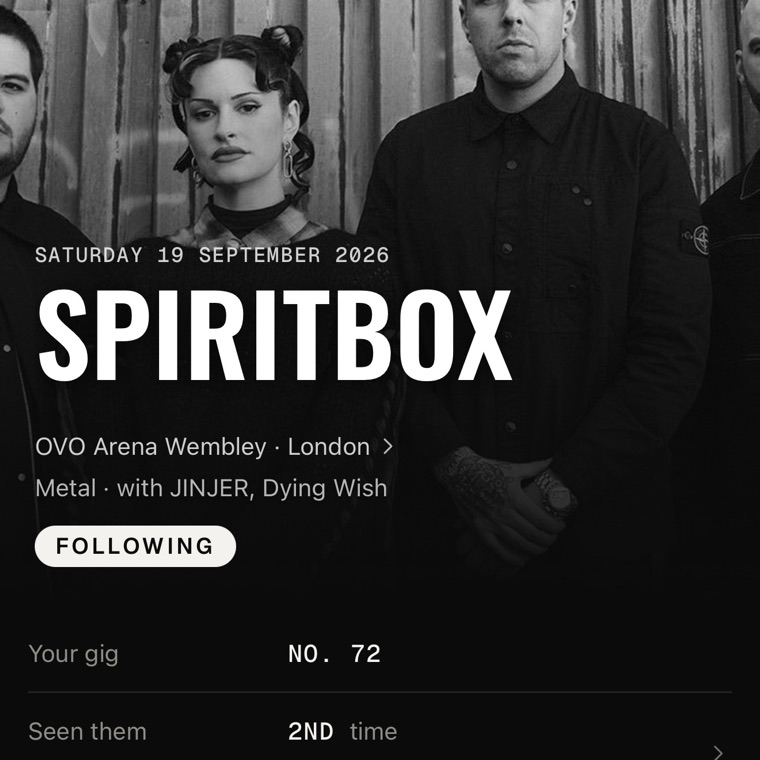
Snap your ticket
Paper or a screenshot: gigstr reads the artist, venue and date for you to check.
Or the poster
Point your camera at a festival's poster and gigstr reads the lineup, headliners first and day by day where the poster splits it. A gig or tour poster works too.
Add the lot from your calendar
On iPhone, gigstr finds the gigs already in your calendar and matches each one to the right night.
Your next gig, at a glance
Home Screen and Lock Screen widgets count down the days on its ticket stub, and Up next lines up the ones after.
The setlist, called
Before the night, gigstr predicts what they'll play.
Getting there
A reminder before every gig, the venue on a map with directions in Apple Maps, Google Maps or Citymapper, and a festival's forecast ten days out.
In your calendar, with everyone
Add a gig to your calendar with who you're going with, the support acts and the venue's address.
02
On the night
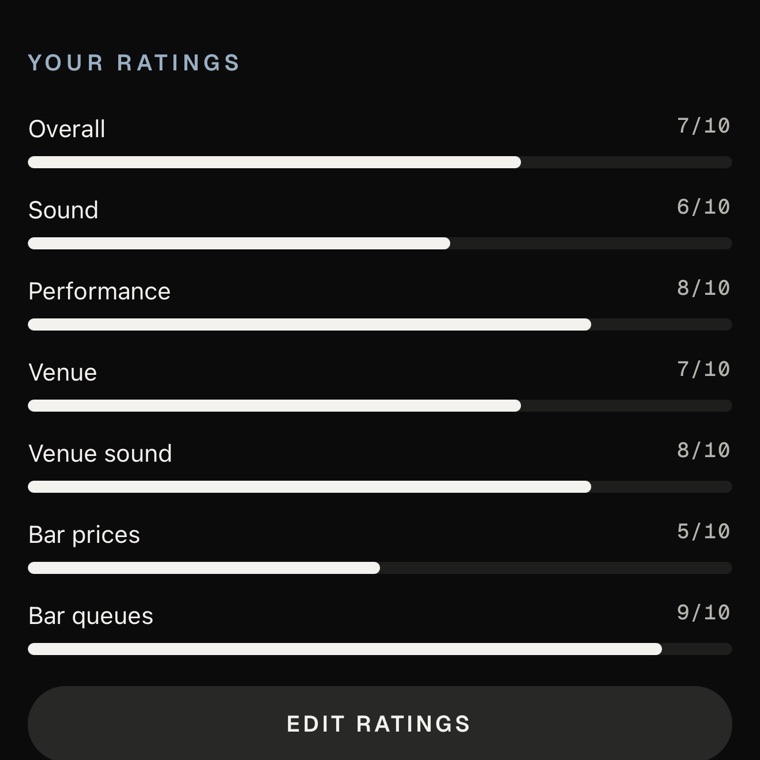
Rate it out of 10
Overall, then the parts that made it: the performance, the sound, the venue, even the bar prices and the queues.
The support acts too
Rate a support act's performance and sound, and add one the listing missed.
Photos from your night
On iPhone, gigstr finds the photos you took at the venue that night. Add up to 10 photos and 5 clips a gig, trim a clip before it goes up, and save them offline at the venue: they upload later.
A whole festival in one go
Add the weekend once, tick off the bands you saw day by day, and rate the festival like a gig.
03
After it
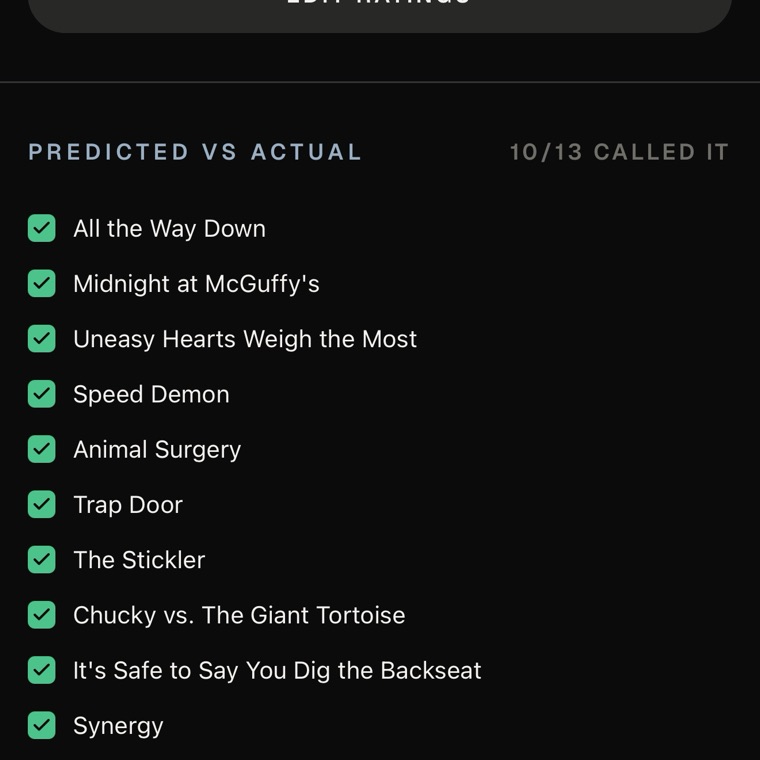
What they actually played
The real setlist, song by song, against the one gigstr called, and every song opens in Spotify, Apple Music or YouTube Music.
Share the night
A card for your story or your feed: the setlist, your ratings, a ticket, a poster, your photos or your whole review.
Write it up
Keep a review to yourself, or publish it for everyone to read.
04
Over the years
Bring your history
Years of gigs at once, from a spreadsheet (another app's export, or your own) or the gigs you've marked on setlist.fm. You check the list before anything is added, and the setlists follow.
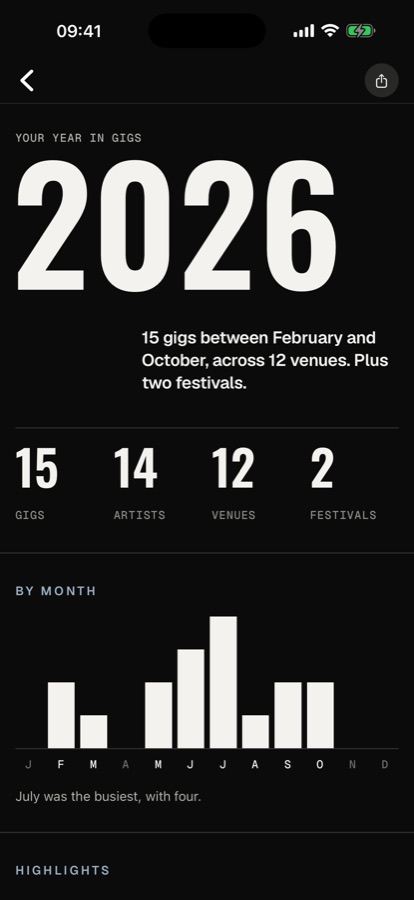
Your year, Wrapped
Your year in gigs as a report, ready to share as a card or a reel.
Your stats
Gigs a year, the songs you've heard live, most-seen bands (support acts included), top genres, longest streaks and busiest nights.
Every venue on a map
Every room you've stood in, pinned.
Every gig numbered
Each gig gets its own ticket stub and its number in your diary: this was gig No. 72.
05
With your buddies, alongside the crowd
Your buddies
Tag who you went with, see what your buddies are going to and how they rated it, and like their nights and photos.
Bring a mate
Went with someone who isn't on gigstr yet? Tag them and send the link: once they join and say they were there, the night goes in their diary and you're buddies.
The crowd's rating
See how everyone who went rated a gig, and read the reviews and photos people share, night by night, on the Reviews and Photos pages.
Top rated
The year's number ones as the crowd rated them: the gig, the live act, the venue for sound, the bar prices. Plus the support acts who upstaged the headliner, the night that split the room, how many perfect 10s have been given, and your own number ones.
Discover
Gigs from the artists you follow, what's on near you tonight, the gigs people have just added, and a page for every artist, venue, genre and song.
Share a gig with anyone
A shared gig opens in the app, and anyone without it can still see the page.
A page of your gigs
Turn on a page of your gigs, your ratings and who you've seen most, and share its link wherever you like. It's off until you do.
What does gigstr do?
It keeps every gig you've been to, and every one you're going to, in one diary. Before the night it counts down and calls the setlist. On the night you rate it out of 10. After it you keep the setlist, your photos and your review, and over the years it turns them into stats and a year you can share.
Is gigstr free?
Yes. gigstr is free, with no limit on how many gigs you add, and nobody is ever shown ads to pay for it.
How do I add a gig?
- Scan your ticket, paper or a screenshot: gigstr reads the artist, venue and date for you to check.
- Scan a festival's poster: gigstr reads the lineup, and you tick the bands you saw.
- Search the artist and pick the night from their dates, past or still to come.
- On iPhone, add the gigs already in your calendar in one go.
- Bring your past gigs in all at once from a spreadsheet or setlist.fm.
- Add it yourself if gigstr doesn't know the gig.
A festival goes in once, with the bands you saw day by day.
Can I add gigs from years ago?
Yes. Bring them in all at once from a spreadsheet or setlist.fm, search the artist and pick the night from their past dates, scan an old ticket, or add it by hand if gigstr doesn't know the gig.
Can I bring my gigs from another app?
Yes. Add your past gigs from a spreadsheet: another app's export, or your own sheet with the artist, venue and date. gigstr also brings in every gig you've marked on setlist.fm and, on iPhone, the gigs already in your calendar, matched to the right night. You see the whole list before anything is added, and the setlists follow over the next few nights.
Where do the setlists come from?
From setlist.fm, the archive fans keep of what every band played. Before a gig, gigstr predicts the set; after it, you see what they actually played, song by song.
Who can see my gigs?
Your profile, the gigs you've added and your photos on them are visible to other people signed in to gigstr. In Profile in the app you can keep them to your buddies, or to only you. You can also turn on a page of your gigs, your ratings and who you've seen most for anyone with its link, and it stays off until you do. Reviews you write are private by default, and your home location is never shown to anyone.
Is there an Android app?
It's on its way to Google Play. Until it lands, gigstr is on iPhone only.
Can I use it on a computer?
Your gigs live in the app: that's where you add them, rate them and relive them. At gigstrapp.com you can sign in to your account to change your password, sign out of your other devices or download your data.
Can I take my data with me?
Yes. Download a copy of everything from Profile in the app or your Account page on the website.
How do I delete my account?
In the app, go to Profile and choose Delete account. It removes everything, everywhere, and it can't be undone. No longer have the app? Email support@gigstrapp.com.
Who makes gigstr?
One person in the UK who has been going to gigs their whole life. Email support@gigstrapp.com and you'll be talking to the person who can fix it.
Is this the gigstr jobs app?
No. gigstr is a live music diary, made in the UK. It has nothing to do with the Swedish app of the same name for finding shifts and short-term work.
Comparing apps?
Gig diaries, comparedGet gigstr
Start with your last gig
Android · coming soon